
Taking a few seconds to do a broadband speed test will give you an idea of how fast your broadband really is. This could be very different from the top speeds advertised by your broadband provider! It’ll vary, depending on the time of day and on what’s happening with your local network, so you’ll get a better idea of the true speeds on your home internet if you run the test a few times.
The speed test will allow you to:

Check your provider is delivering the speeds agreed.
Do multiple tests at different times of day to see if your speed is affected.
Compare your existing broadband speeds with other providers.
Decide whether your current broadband speed matches the needs of your household.
Broadband speed is measured in kilobits per second (Kbps) and megabits per second (Mbps). The higher number of bits you're able to download per second, the faster your connection will be.
There are two checks that can help you gauge how fast your current broadband is - download and upload speed:
This is the speed at which information travels from the internet to your device.
Having a faster download speed should make your connection speedier and smoother, so you're not interrupted by buffering or lag when doing things such as watching TV or playing video games online.
The reverse of download speed, this is how fast information travels from your device to the internet.
It also includes many day-to-day online activities, such as sending emails and posting photos/videos to social media.
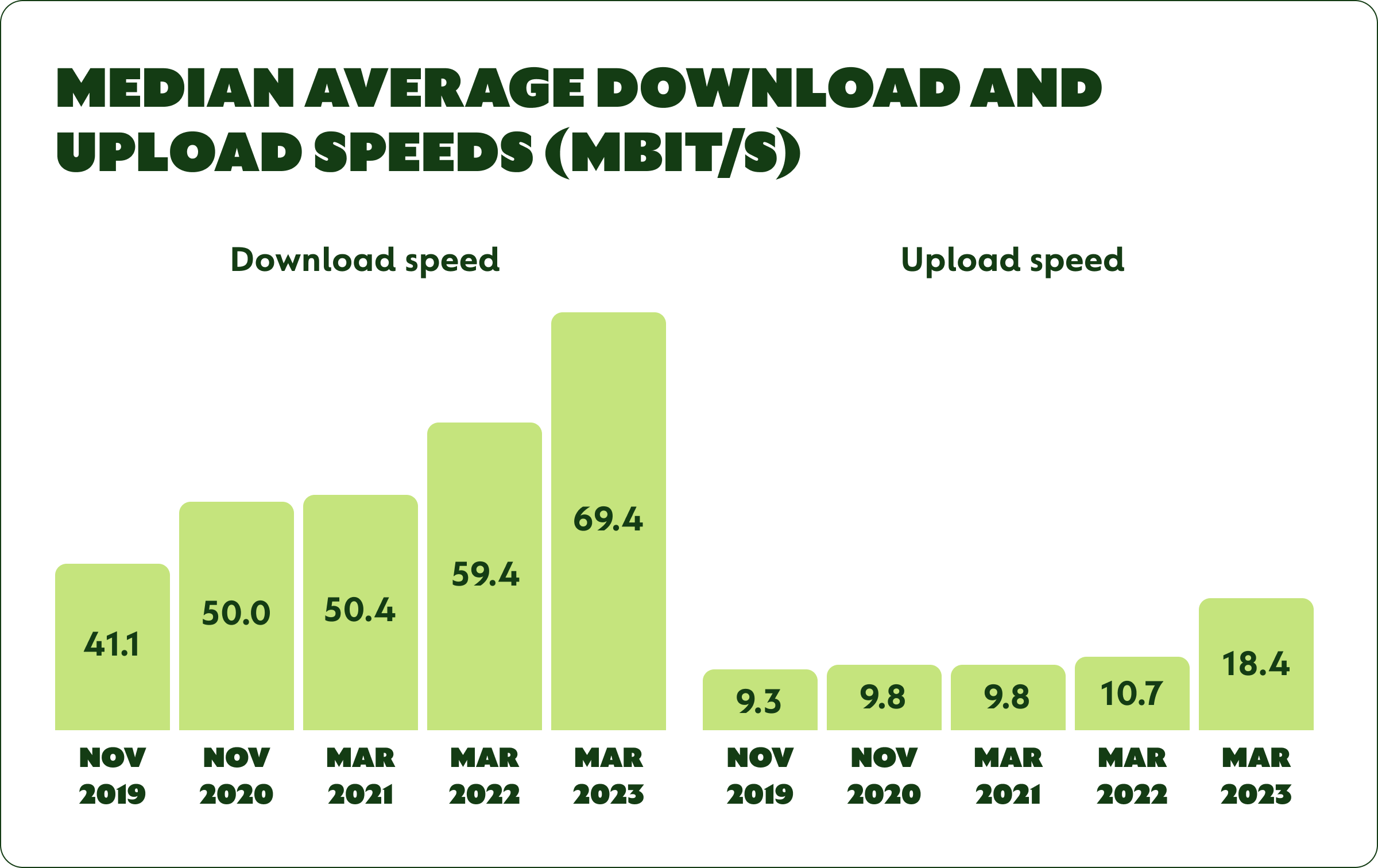
According to Ofcom[1], average home broadband connection speeds keep increasing.
By March 2023 the median average download speed of UK home broadband connections was 69.4 Mbit/s, a 10.0 Mbit/s (17%) increase on the previous year, as people upgraded to faster services.
If you're experiencing consistently low speeds, speak to your provider about different broadband packages.
Alternatively, you can always switch to a different provider that offers speeds more in line with what you're looking for.
There are a few things you can do to get the most accurate results from your broadband speed test, including:
1
Make sure you have no other devices or consoles connected to your Wi-Fi during a broadband speed test, as these can interfere with the connection and therefore the results.
2
Close all other open tabs in your browser, as well as all other windows and/or apps currently open.
3
Wifi is often the most unpredictable bit of your internet connectivity, so it can mess up the results of a broadband speed test. For maximum accuracy, connect the router using an ethernet cable rather than using the wifi.
4
This includes any antivirus software and also your firewall if possible.
5
Test your broadband speed at various times throughout the day to see whether it speeds up or slows down.
There are lots of things that can affect broadband speed, including:

Currently, Full Fibre (also known as FTTP) is the fastest type of broadband connection you can have. If your connection uses an older type of fibre optic cables or the even older copper wiring, your speed will be comparatively less.

If your home is connected to the local exchange by copper wiring, the physical distance from the exchange will make a difference to your broadband speeds. With fibre-optic it doesn’t matter.
BT Openreach is busy upgrading the metal cable network to fibre optic at the moment. Work is happening fast, so it’s worth checking if your area has been done yet. Upgrading to fibre-optic could really boost your home broadband speed.

The speed of your home internet service will depend on how many people are using it at the same time.
Whether you're a student or live in a busy family home, households with multiple users on desktops, laptops, mobiles and tablets often experience slower internet.

> Broadband speeds can slow down during peak internet usage times, usually between 6 and 11 pm.
Rain, wind and extreme weather conditions can also all affect broadband speeds.

If your router is old or faulty, this could be another reason for slow broadband speeds or a patchy connection. After a few years routers can start to fail and might need replacing. So can the cabling attached to the router.
When you switch broadband providers, the new provider will almost always send you a new router for free. If your router is having age-related issues, take this as a sign that you’re overdue for a new broadband deal.

Viruses, adware and malware not only slow down your internet but also the device you're browsing with. They can also seriously compromise your online security.

Your router could be unhappy in its current position. Keep it away from damp areas or heat sources. If the signal is strong in one room but not another, it’s definitely a wifi issue rather than a slow connection. So try a wireless extender to bounce the signal further.

There are a few possible reasons why your broadband speed changes at different times of day. The most likely culprits for a slow connection at specific times are:
If your broadband is consistently too slow at certain times of day, contact your broadband provider to ask what they can do about it.
If your speed test returns results that are slower than the speeds your provider has advertised, you might be able to boost your broadband speed by trying the following:
The equipment you’re using could be putting the brakes on broadband speeds, rather than the connection itself. If your router is a few years old, don’t be afraid to ask your provider for a new one.
To get the best out of your router, it’s a good idea to plug it into your home’s main phone socket, rather than using an extension. Keep it in as central a location as possible and elevate it if you can. Don’t keep it on the floor. Also keep it away from other equipment which emits wireless signals, such as baby monitors or cordless phones.
While going fully wireless is the dream, you’ll undoubtedly get faster internet access if you connect your device to the router using an ethernet cable, rather than relying on wifi. This isn’t always possible. But if your TV or laptop are fairly close to your router, this method should speed things up. It will also help you to see if the problem is with the wifi or the internet connection itself.
If you get good wifi speeds near your router but it’s patchy in rooms further away, there are ways of boosting your signal. Investing in adapters such as devolo’s Magic wifi range allows you to transmit a wifi signal from any plug socket in your home, with the data sent via your powerlines. This is a much more effective method than using traditional wifi boosters.
Because of infrastructure improvements, the broadband speeds for most households are increasing all the time. If you’ve been on a contract for the past couple of years, it’s likely that switching providers will get you a faster connection. It might not cost more either; the price per Mbps has been falling as the tech improves.
The fibre optic rollout is happening fast, but many areas of the UK still have the old-style copper wiring, or a mix of the two. If that’s you, the fastest deals on offer might be “hybrid fibre”: a fibre optic connection to the box on your street but then copper for the final connection to your home. This will probably still be faster than what was available a couple of years ago. It’s always worth checking out your options.
Broadband is getting faster all the time, so if you haven’t switched recently you can probably upgrade your speed. Right now the fastest deal on offer is a dizzying 7,000 Mbps with YouFibre Ultrafast Full Fibre Broadband.
Most people won’t actually need their connection to be that fast. There are also quite a few great deals around the 2,000 to 2,3000 Mbps mark - probably still more speed than you need.
Anything over 250 Mbps should be fast enough even for a household with multiple gamers, streamers and Skypers. There are dozens of products offering these speeds right now, so you have plenty of choice. The competitive market means you can compare on other factors like price and customer service but still get a really fast home connection.
When you come to the end of a fixed broadband contract, most providers will automatically shift you onto a new contract or simply a default rolling payment. This usually means your monthly payments go up for no good reason. Time to switch!
Your provider is legally obliged to remind you when your contract is coming to an end, so treat this as a prompt to start shopping around for a better deal.
It’s a common misconception that your provider has to offer existing customers their best deals. There’s no reward for loyalty, and most broadband providers save their best prices for attracting new customers.
The rising cost of living means you might not get a cheaper deal than your old contract, but it’s highly likely that you’ll get much better speeds for a similar price. Either way, it’s almost always worth switching when possible and it only takes a few moments to compare deals.
[1] Ofcom, UK Home Broadband Performance published September 2023